

Has your personal data been recently exposed?
Check if information like your Social Security number, email, and passwords is exposed on the dark web.


You have reached the maximum number of scans allowed. Please come back after 24 hours.

Scanning the dark web...
Scanning public databases...
Scanning millions of records...
Narrowing down the search...
We need more information
Please enter a few more details to ensure we show you the right information.
You’re at high risk
We found your personal information on the dark web and on data broker sites.
 Up to $3M Reimbursement for identity theft, with up to $1M for Stolen Funds†††
$10K Scam Reimbursement7
Scam Support
Credit, Checking and Savings Activity Alerts: Unlimited Accounts
Credit & Payday Loan Lock2
Credit Monitoring:
3 Bureau1
Automatic Data Broker Removal8
Dark Web Monitoring
Priority 24/7 Customer Phone Support
Up to $3M Reimbursement for identity theft, with up to $1M for Stolen Funds†††
$10K Scam Reimbursement7
Scam Support
Credit, Checking and Savings Activity Alerts: Unlimited Accounts
Credit & Payday Loan Lock2
Credit Monitoring:
3 Bureau1
Automatic Data Broker Removal8
Dark Web Monitoring
Priority 24/7 Customer Phone Support
LifeLock Total

No one can prevent all cybercrime or prevent all identity theft.
- Price valid for introductory term. After that, your price will renew at the standard price.
- Your subscription begins immediately after your transaction is complete. A payment method is required at sign-up for trials, and you will be charged at the end of your trial, unless canceled first.
- Prices are subject to change and may be charged up to 35 days prior to renewal. Cancel here or contact Member Services.
- Restrictions apply. Automatically renewing subscription required. If you're a victim of identity theft and not satisfied with our resolution, you may receive a refund for the current term of your subscription. See lifelock.norton.com/guarantee for complete details.
††† Up to $1 million coverage for Lawyers and Experts included with all plans. Reimbursement and expense compensation vary according to plan. Insurance benefits are issued by third parties. See lifelock.norton.com/legal for policy info.
1 Bureau Monitoring and Monthly Credit Report and Score / 3 Bureau Monitoring and Monthly Credit Report and Score.
2 Credit Lock cannot prevent all account takeovers, unauthorized account openings, or credit file inquiries. Deactivates if you downgrade or cancel your subscription.
7 Scam protection coverage as part of identity theft benefits is currently available to all customers residing in the United States, including U.S. territories and the District of Columbia, with the exception of residents of New York. Gen Digital is not a licensed insurance producer. Benefits under the Master Policy are issued and covered by HSB Specialty Insurance Company. You can find further details and exclusions in the summary of benefits.
8 After setup, automatic data broker removal service scans and requests removal every 90 days.
You’re at medium risk
We found your personal information on data broker sites.
Up to $1.2M Reimbursement for identity theft, with up to $100K for Stolen Funds†††
$5K Scam Reimbursement7
Scam Support
Credit, Checking and Savings Activity Alerts:
5 Accounts
Credit & Payday Loan Lock2
Credit Monitoring:
3 Bureau1
Automatic Data Broker Removal8
Dark Web Monitoring
Priority 24/7 Customer Phone Support
LifeLock Advanced
No one can prevent all cybercrime or prevent all identity theft.
- Price valid for introductory term. After that, your price will renew at the standard price.
- Your subscription begins immediately after your transaction is complete. A payment method is required at sign-up for trials, and you will be charged at the end of your trial, unless canceled first.
- Prices are subject to change and may be charged up to 35 days prior to renewal. Cancel here or contact Member Services.
- Restrictions apply. Automatically renewing subscription required. If you're a victim of identity theft and not satisfied with our resolution, you may receive a refund for the current term of your subscription. See lifelock.norton.com/guarantee for complete details.
††† Up to $1 million coverage for Lawyers and Experts included with all plans. Reimbursement and expense compensation vary according to plan. Insurance benefits are issued by third parties. See lifelock.norton.com/legal for policy info.
1 Bureau Monitoring and Monthly Credit Report and Score / 3 Bureau Monitoring and Monthly Credit Report and Score.
2 Credit Lock cannot prevent all account takeovers, unauthorized account openings, or credit file inquiries. Deactivates if you downgrade or cancel your subscription.
7 Scam protection coverage as part of identity theft benefits is currently available to all customers residing in the United States, including U.S. territories and the District of Columbia, with the exception of residents of New York. Gen Digital is not a licensed insurance producer. Benefits under the Master Policy are issued and covered by HSB Specialty Insurance Company. You can find further details and exclusions in the summary of benefits.
8 After setup, automatic data broker removal service scans and requests removal every 90 days.
Good news!
We didn’t find your personal information across millions of records or on public data sources.
Up to $1.05M Reimbursement for identity theft, with up to $25K for Stolen Funds†††
Identity Restoration Specialists
Credit, Checking and Savings Activity Alerts:
2 Accounts
Credit & Payday Loan Lock2
Credit Monitoring:
2 Bureau1
Automatic Data Broker Removal8
Dark Web Monitoring
Breach Alerts
24/7 Customer Phone Support
Lifelock Core
No one can prevent all cybercrime or prevent all identity theft.
- Price valid for introductory term. After that, your price will renew at the standard price.
- Your subscription begins immediately after your transaction is complete. A payment method is required at sign-up for trials, and you will be charged at the end of your trial, unless canceled first.
- Prices are subject to change and may be charged up to 35 days prior to renewal. Cancel here or contact Member Services.
- Restrictions apply. Automatically renewing subscription required. If you're a victim of identity theft and not satisfied with our resolution, you may receive a refund for the current term of your subscription. See lifelock.norton.com/guarantee for complete details.
††† Up to $1 million coverage for Lawyers and Experts included with all plans. Reimbursement and expense compensation vary according to plan. Insurance benefits are issued by third parties. See lifelock.norton.com/legal for policy info.
1 Credit features require successful setup, identity verification, and sufficient credit history by the appropriate credit bureau. Credit monitoring features may take several days to activate after enrollment.
2 Identity Lock cannot prevent all account takeovers, unauthorized account openings, or credit file inquiries. Deactivates if you downgrade or cancel your subscription.
8 After setup, automatic data broker removal service scans and requests removal every 90 days.

 Why do we ask?
Finding your match...

10 cents
If your information is exposed or stolen in a data breach, it can end up on the dark web where it can be sold for as little as 10 cents.
100M+
LifeLock monitors hundreds of millions of data points a second.
- Up to $1.05M Reimbursement for identity theft, with up to $25K for Stolen Funds†††
- Up to $1.2M Reimbursement for identity theft, with up to $100K for Stolen Funds†††
- Up to $3M Reimbursement for identity theft, with up to $1M for Stolen Funds†††
- Up to $1.05M Reimbursement for identity theft, with up to $25K for Stolen Funds††† for each adult
- Up to $1.2M Reimbursement for identity theft, with up to $100K for Stolen Funds††† for each adult
- Up to $3M Reimbursement for identity theft, with up to $1M for Stolen Funds††† for each adult
- Up to $1.05M Reimbursement for identity theft, with up to $25K for Stolen Funds††† for each adult
- Up to $1.2M Reimbursement for identity theft, with up to $100K for Stolen Funds††† for each adult
- Up to $3M Reimbursement for identity theft, with up to $1M for Stolen Funds††† for each adult
- Credit Monitoring Coverage1
- Credit Monitoring1 each adult
- Credit Monitoring1 for family
- Credit, Checking & Savings Account Activity Alerts
- Credit, Checking and Savings Activity Alerts for each adult
- Credit, Checking and Savings Activity Alerts for family
- 401K & Investment Account Activity Alerts
- 401K/Investment Account Alerts for each adult
- 401K/Investment Account Alerts for family
- Recurring and Unusual Charge Alerts
- Unexpected & Suspicious Charge Alerts for each adult
- Unexpected & Suspicious Charge Alerts for family
- Stolen Funds Reimbursement†††
- Stolen Funds Reimbursement††† for each adult
- Stolen Funds Reimbursement††† for family
- Lawyers and Experts†††
- Lawyers & Experts††† for each adult
- Lawyers & Experts††† for family
- Automatic Data Broker Removal8
- Automatic Data Broker Removal8 for each adult
- Automatic Data Broker Removal8 for family
- Scam Reimbursement7
- Scam Reimbursement7 for each adult
- Scam Reimbursement7 for family
- Credit Reports & Scores1
- Credit Report & Score for each adult
- Credit Report & Score for family
- Social Media Monitoring
- Social Media Monitoring for each adult
- Social Media Monitoring for family


††† Up to $1 million coverage for Lawyers and Experts included with all plans. Reimbursement and expense compensation vary according to plan. Insurance benefits are issued by third parties. See LifeLock.Norton.com/legal for policy info.
1 Credit features require successful setup, identity verification and sufficient credit history by the appropriate credit bureau. Credit monitoring features may take several days to activate after enrollment.
7 Scam protection coverage as part of identity theft benefits is currently available to all customers residing in the United States, including U.S. territories and the District of Columbia, with the exception of residents of New York. Gen Digital is not a licensed insurance producer. Benefits under the Master Policy are issued and covered by HSB Specialty Insurance Company. You can find further details and exclusions in the Summary of Benefits.
8 After setup, automatic data broker removal service scans and requests removal every 90 days.
Why do we ask?
Identifying your concerns gives us the ability to recommend the right plan for your needs.
Why do we ask?
Knowing this number helps us recommend coverage that fits your needs.
Why do we ask?
Providing your email address makes you eligible for notifications of potential identity threats.
What happens if you click on a phishing link?
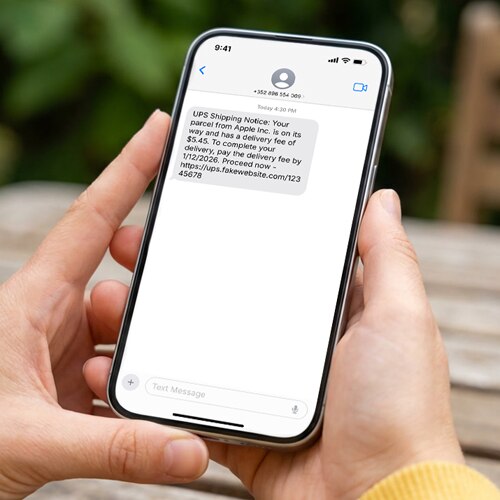
You get an email claiming there’s an issue with your delivery or account and need to verify your details. You click the link provided without thinking, then realize something feels off. Learn what happens if you click on a phishing link, steps you can take to prevent further damage, and how identity theft protection can help keep your personal information private.




Phishing is a form of social engineering where hackers impersonate trusted brands or people to trick you into revealing sensitive information or downloading malware. In the first three months of 2025, the Anti-Phishing Working Group observed more than one million phishing attacks.
Research by KnowBe4 also suggests nearly 83% of phishing emails now use AI-generated content, which allows scammers to scale faster and trick more people with convincing phishing schemes.
Clicking on a phishing link can have serious consequences, from stolen login credentials and financial loss to identity theft. Read on to discover what happens when you click on a phishing link, and how to mitigate further damage.
It could lead to a malware infection
Phishing links can carry hidden scripts or send you to compromised sites that attempt to auto-install malicious software when the page loads. You may not even notice that this is happening.
Here are a few types of malware that can slip onto your device:
- Keyloggers: These programs quietly log every keystroke you make, allowing attackers to capture sensitive information such as passwords, bank account numbers, or personal messages.
- Ransomware: This software locks your files, photos, financial documents, or entire computer. The scammer can then demand payment to restore access.
- Rootkits: Deep-level malware that buries itself inside your operating system, making it difficult to detect or remove, potentially giving attackers long-term access to your device.
- Remote Access Trojans (RATs): RATs are stealth programs that let hackers secretly spy on and control your computer remotely.
It could lead to a fake website
Phishing links often send you to fake websites that look like a well-known company or organization. These could imitate anything from your bank to parcel and delivery services to online stores.
A recent Gen Threat Report details “VibeScams,” which refers to scammers tricking you into feeling that a website passes the “vibe check” rather than relying on sophisticated code. The colors, logo, and even the fine print look so familiar at first glance that you instinctively trust the site.
Once you click through, these fake sites prompt you to enter sensitive or personally identifiable information, like your mother’s maiden name or credit card details. The scammer may then use these for identity theft or sell your data on the dark web.
It could lead to an account takeover
If the phishing link leads you to a fake login page where you enter your username and password, you may have granted the attacker control over your account. From there, the scammer could log in as you, change your password, and lock you out completely.
Depending on the type of account hijacked, the scammer might make fraudulent purchases, or send phishing emails or social media messages to your contacts to keep the scam going.
It could lead to network breaches
A network breach happens when an attacker gains unauthorized access to a private home or business network, potentially compromising all connected devices. For example, if you click a phishing link that installs a worm on your device, it might self-replicate and spread across the rest of the network. This gives cybercriminals access to a wider set of sensitive information.
It could lead to targeted phishing attacks
Clicking a phishing link can make you a target for even more personalized phishing attacks. When scammers know you’ve engaged once, they may flag your email address or phone number as “responsive,” signaling that you’re more likely to interact again. This can increase the number of spam calls or emails you receive.
If attackers steal personal info in the original attack, they can tailor future scams using the information harvested, such as your name, contacts, employer, or recent activity. This can lead to highly targeted phishing attacks that feel more relevant and convincing.

How do I know I’ve clicked on a phishing link?
Clicking a phishing link doesn’t always lead to immediate damage, but there are often warning signs. You may be redirected to a suspicious website, prompted to sign in unexpectedly, or pressured to act quickly. In some cases, malware may install in the background, causing your device to behave strangely.
Here are some common signs you may have clicked a phishing link:
- Your device runs slowly or freezes: Clicking a malicious link can covertly install malware, interfering with your system. You may notice unfamiliar programs launching, frequent crashes, or a noticeable slowdown in performance.
- The website doesn’t match the real brand: A fake site might look similar to the real thing, but on closer inspection, you may notice there’s something “off” about it. It’s often small details like a blurry logo, the brand colors are slightly different, or the site layout has changed.
- The domain has a suspicious URL: Scammers create lookalike domains using mismatched URLs. For example, the “o” in LifeLock might get replaced with a zero, so the domain reads “lifel0ck.norton.com.”
- You’re sent to a sign-in page: Phishing links can lead to fake login pages designed to steal your credentials. If you’re unexpectedly prompted to enter your password, or verify your identity or payment details, that’s a red flag.
- The page uses false urgency: Many phishing pages rely on panic to override caution. Countdown timers, warnings about suspicious activity, or pop-ups claiming your device is infected are scare tactics designed to rush you into acting without thinking.

If you click on a phishing link, here’s what to do
If you clicked on a phishing link, don’t engage any further. You should also disconnect from Wi-Fi so you can safely scan for malware. Then, secure any compromised accounts and report the incident.
Here’s what to do if you click a phishing link:
- Disconnect from Wi-Fi: Disconnecting from the internet can reduce the risk of fully downloading malware, sending data to hackers, or spreading threats to other devices on your network. Stay offline until you’ve run a malware scan and confirmed your device is safe.
- Stop any automatic downloads: If something started to download when you clicked the link, cancel it immediately and delete the file from your system.
- Scan for malware: Run a full scan using antivirus software to check for hidden threats. Ensure your security software is up to date to detect the latest threats.
- Secure compromised accounts: Choose a strong, unique password for any account that could be compromised and enable two-factor authentication (2FA).
- Report the scam: Forward phishing emails to the Anti-Phishing Working Group at reportphishing@apwg.org and report the message as a scam in your inbox. If you gave out your personal or financial information, contact your bank or credit card company immediately. You can also file a report with the FTC and IC3 to help these organizations track scams.
- Protect your credit: Consider investing in identity theft protection to help monitor your credit and recover if you fall victim to identity theft. You should also freeze or lock your credit if your personal data was exposed due to the scam.
How to protect yourself from phishing attacks
Even when you know how to spot a fake email or text, there are other steps you should take to help protect yourself from phishing scams. You should keep your devices updated, use scam protection software, remove your personal information online, and always think before sharing sensitive information.
Here are more details:
- Take your time: Stop and think before clicking a link in unexpected messages or requests that seem out of place. That includes from your bank, your family, and other trusted individuals. If you’re ever in doubt, contact them another way to check their intentions.
- Update your devices regularly: Outdated software leaves your device vulnerable. Turn on automatic updates for your operating system and apps to ensure you don’t miss out on critical security patches.
- Remove your personal data online: Make sure scammers can’t easily find your email address and other personal details online. Remove your info from data broker sites and keep your social media accounts private. If you need a public profile, don’t share any identifying information, and don’t re-use any public info for passwords or account credentials.
- Use caution when sharing sensitive information: Avoid sharing personal or account information in response to an unsolicited email or text. Any organization you do business with will rarely ask for it out of the blue.
- Use third-party security software: Robust cybersecurity software can help protect against phishing attacks by scanning emails, links, and websites for threats and alerting you before you interact with them. They should also block malware downloads.
Don’t let phishing links put your data at risk
A combination of staying alert, keeping your devices updated, and monitoring your data online can help reduce your risk of identity theft and fraud. LifeLock can help monitor your personal data and send you notifications if your Social Security number, name, or address is used to open credit. And with features like Privacy Monitor, it can help you find and remove personal info on data broker sites, making it that little bit harder for scammers to find you in the first place.
FAQs
What if I clicked on a phishing link but didn’t enter my password?
Clicking on a phishing link can be potentially harmful even if you didn't enter a password, because the link may install malicious software. If you think you’ve clicked a phishing link, it’s a good idea to disconnect from the internet, scan your device for malware, and change any potentially compromised passwords.
Is it safe to open an email but not click the link?
Yes, in most cases it’s safe to open an email as long as you don’t click any links, download attachments, or reply with sensitive information. If an email appears suspicious, mark it as spam before deleting it. This helps your email provider learn to filter out similar messages in the future.
What happens if you click a phishing link on your iPhone?
Clicking a phishing link on your iPhone can lead to a fake site that steals your info or triggers pop-ups urging you to download malicious apps. While iPhones have strong security, sharing personal information with a cybercriminal over any platform puts your data at risk.
Editors' note: Our articles provide educational information about identity theft, scams, financial fraud, and other topics that can put your identity or personal accounts at risk. LifeLock offerings may not cover or protect against every type of crime, fraud, scam, or threat we write about. For more details about how we write, review, and update our articles, see our Editorial Policy.
Related articles